Showing posts with label Doing a poster. Show all posts

Saturday, December 7, 2024

AGU Fall Meeting 2024 poster - Digital eaRth Twins Hydrology Systems

The "Digital Earth" (DE) metaphor is highly beneficial for both end users and hydrological modelers. In this contribution, we analyze different categories of models with the aim of incorporating them into Digital eARth Twin Hydrology systems (DARTHs). We emphasize that DARTHs are not merely models; they are a comprehensive infrastructure that hosts specific types of models and provides essential services for connecting to input data. We advocate for a modeling-by-component strategy to meet the requirements of the DE. We envision four technological steps to advance from the current state of modeling.
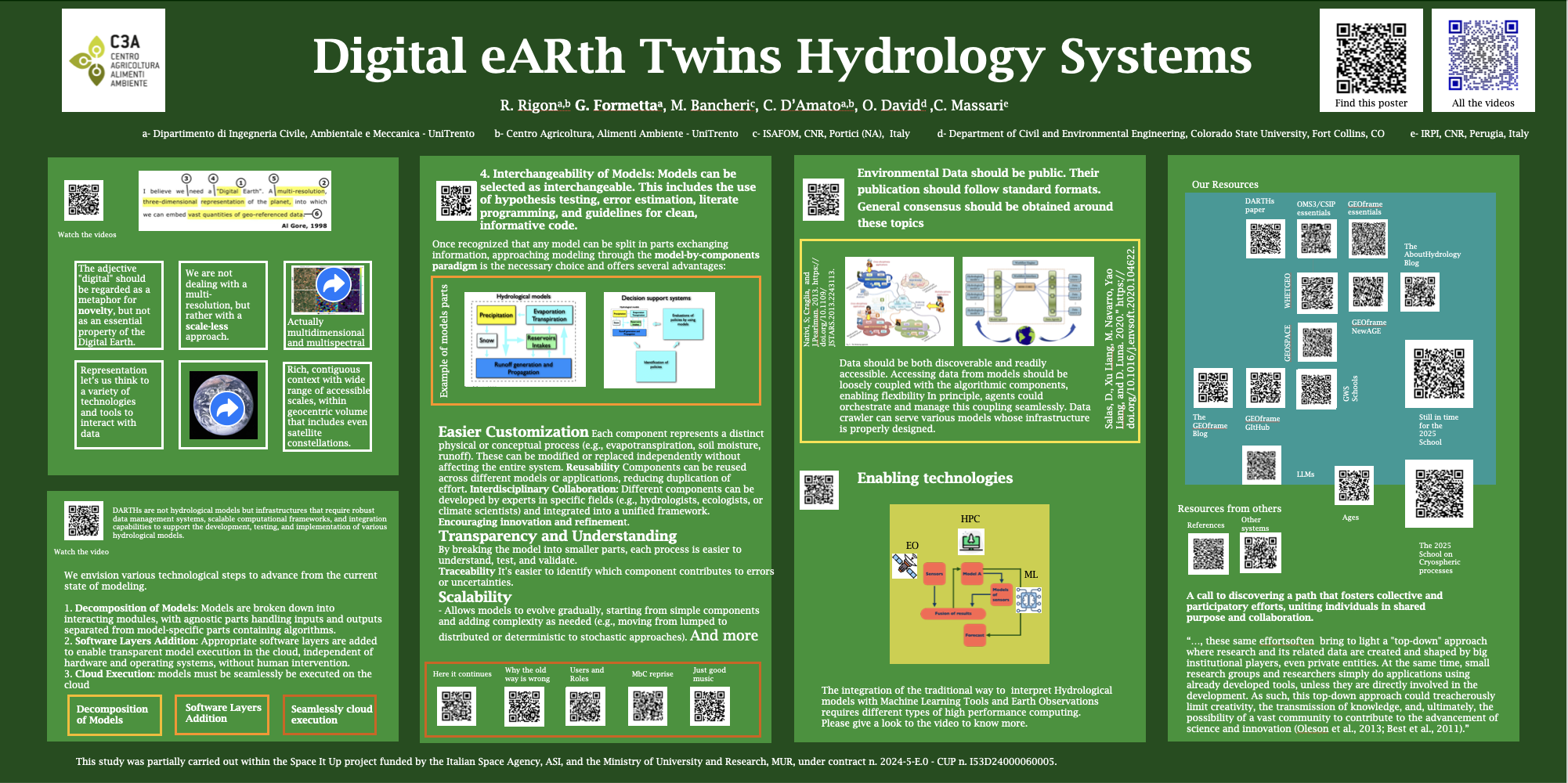
  1. Decomposition of Models: Models are broken down into interacting modules, with agnostic parts handling inputs and outputs separated from model-specific parts containing algorithms.
  2. Software Layers Addition: Appropriate software layers are added to enable transparent model execution in the cloud, independent of hardware and operating systems, without human intervention.
  3. Cloud Execution:
  4.  Interchangeability of Models: Models can be selected as interchangeable without providing deceptive answers. This includes the use of hypothesis testing, error estimation, literate programming, and guidelines for clean, informative code.
We argue for the urgency of making DARTHs open source in alignment with the open-science movement. DARTHs should promote a new participatory approach to hydrological science, allowing researchers to cooperatively contribute to characterizing and controlling model outcomes in various territories.
Finally, we discuss three enabling technologies within the context of DARTHs: Earth observations (EOs), high-performance computing (HPC), and machine learning (ML). We explore how these technologies can be integrated into the overall system to enhance scientific research and generate knowledge.
By clicking here please find the pdf of the poster.  Please find here the slides used in videos.  

Friday, May 24, 2024

How to make an iPoster with usual paper media

Most researchers aim to present their work at conferences, often considering an oral presentation as the ideal outcome. Conversely, being assigned to present a poster can sometimes be seen as a second choice. However, I believe this perception overlooks the unique opportunities posters provide. Interacting with attendees at a poster session often leads to more in-depth conversations than those following an oral presentation.


Recognizing this potential, some conferences, such as the European Geosciences Union (EGU), have innovated with new formats like the PICO (Presenting Interactive COntent) sessions. These sessions enhance the traditional poster experience by allowing researchers to present their work on touch screens, making the interaction more dynamic and engaging than paper posters. This approach has gained popularity and expanded over time.

Unfortunately, smaller conferences may not have the resources to provide touch screens for such interactive experiences. As an alternative, I've experimented with a method that partially recreates the PICO experience. The idea is to make the poster more visual and less text-heavy while incorporating QR codes that link to short videos explaining different parts of the poster. These videos can cover the abstract, references, and explanations of figures.

Implementing this iPoster strategy involves some technical steps: recording the videos, uploading supplemental material for immediate access, and creating QR codes. Recording videos is now straightforward; you can use a virtual meeting platform to record yourself presenting the poster. For hosting the videos and additional materials, I prefer using the Open Science Framework (OSF), which allows for the visualization of PDFs, videos, and Jupyter notebooks without needing to download them first. Videos can also be uploaded to platforms like YouTube or Vimeo.

Once you have your materials uploaded, you can generate QR codes using one of the many available online tools. Embed these QR codes into your poster at relevant points. This way, visitors can access the supplementary material directly from their mobile devices while viewing your poster, even if you are not present.

This approach enhances the traditional poster session, making it more interactive and informative. While there is always room for improvement, this method can significantly enrich the experience for both presenters and attendees.

Clicking on the Figure above you can see and download the iPoster Example. This was actually derived from this poster. For a more generic/general post on how to do poster, please give a look to this blog post. 

Everything is improvable !

Tuesday, March 27, 2018

Making a good poster

Everybody fight for having an oral presentation at conferences. However, a poster is often not a bad idea. A poster is like a resume. His scope is not to tell everything about your work, but to attract potentially interested people from who you can have nice conversations, learn something, start a collaboration. To get the general idea of an award winning poster, give a close look to the poster below, that is part of a dedicated page on Nature.
A less traditional layout is the one of the poster to which I dedicated the first post of this year. Finally informative guidelines by:
Obviously, it is assumed that you have something to tell (but this is another topic).